| Deutsch
+49 (0)911/462676-0 | info@cosmino.de
 

Cosmino MES Modules

Cosmino MES


Modules and Features at a Glance

Capture production data, analyze losses, ensure quality, or control manufacturing processes: Cosmino MES modules let you configure the capabilities you need. The modules share data and can be combined and added as your requirements evolve.

Machine Data Acquisition – MDA

Capture what is actually happening at your machines. Cosmino MES automatically collects machine and process data—directly from controllers, through middleware, or via retrofitted sensors. This also allows older machines to be connected.

Signal acquisition and interpretation are flexibly configurable. Multiple signals can be combined to identify a clear machine state. Depending on the process context, individual signals can be selectively taken into account or ignored—for example, a program start or a quantity signal during maintenance or setup. Plausibility checks and processing rules help accurately represent machine states and quantities, handle counter resets, and identify and exclude incorrect signals.

  • Capture machine states, cycles, and production quantities
  • Visualize process parameters and monitor them against defined limits
  • Exchange information with connected machine controllers

Learn more: Connecting Old and New Machines

Production Data Acquisition – PDA

Connect your production orders with actual production data. Production Data Acquisition provides real-time visibility into order progress at machines and manual workstations.

  • Import order data from the ERP system and report production data back
  • Capture run times, machine states, and quantities for each operation
  • Display current order and production data at the workstation
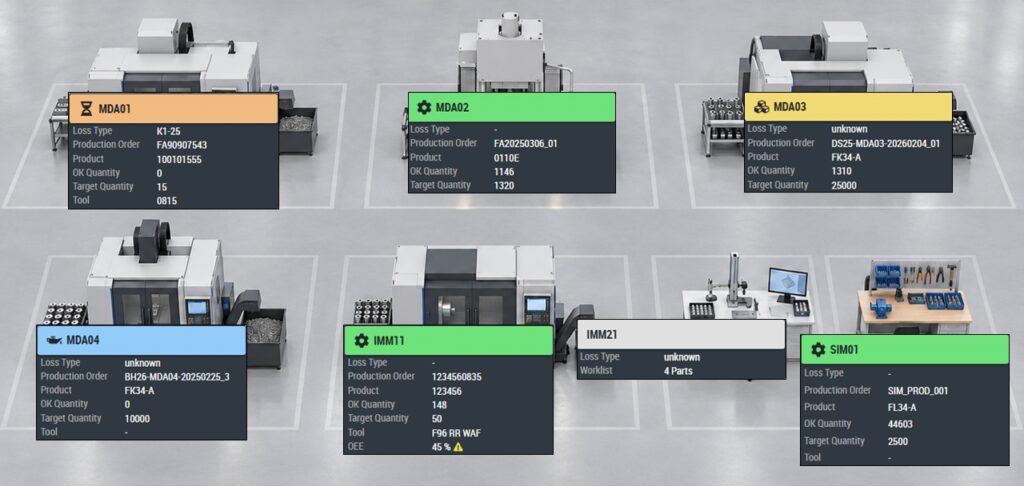
Cosmino MES: Configurable factory overview with real-time production data

Overall Equipment Effectiveness – OEE

Identify where availability, performance, and quality are being lost. The OEE module enables you to analyze downtime and performance losses along with their causes.

  • Record downtime and reduced performance by loss reason—automatically using machine signals, manually, or through a combination of both
  • Configure notifications for specific loss types or when defined time thresholds are exceeded
  • Analyze major sources of loss using a comprehensive set of best-practice reports

Learn more: Using OEE Effectively

Tool Management System

Extend your view of machines and orders to include the tools and tool components in use. Track their usage, production quantities, and run times.

  • Document tool usage and tool changes
  • Manage assembled tools and their components—including assembly, disassembly, and component reuse
  • Account for multiple parts per cycle, different products, and mold cavities
  • Analyze the usage history and performance of individual tools

Material Tracking & Tracing

Track which materials and batches were used for an order or consumed during processing, and in what quantities. Verify that the materials used match those assigned in advance, or record actual material usage for transparency and traceability.

  • Display bills of materials and material information for the order
  • Record materials used, quantities, and batch numbers
  • Report material consumption back to the ERP system or other systems

Quality Data Management

Record defect types and locations in a structured way and analyze recurring quality issues in reports. Depending on the combination of modules, defects are recorded against the production order, the individual part with its serial number, or the incoming materials used.

  • Define relevant defect types in inspection plans
  • Record defect types and locations using defined catalogs
  • Mark defect locations on a product image
  • Analyze defect frequencies and quality trends

Statistical Process Control – SPC

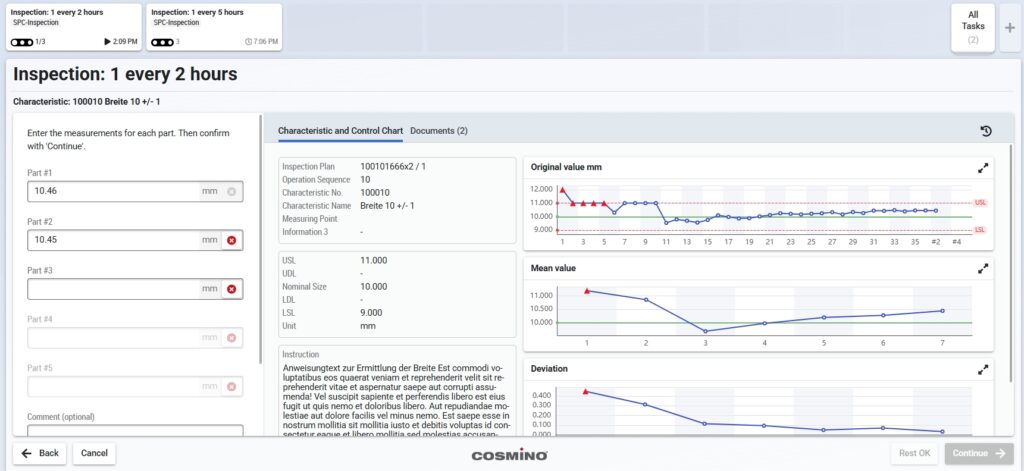
Plan, perform, and evaluate sample-based quality inspections in a single system. The SPC module calculates statistical metrics as data is collected and displays control charts on the shop floor, allowing immediate assessment of process stability and capability.

  • Define inspection plans with inspection characteristics, intervals, samples, and inspection rules
  • Capture measurements in guided dialogs or import them automatically from connected measuring machines
  • Display control charts and statistical metrics such as mean, standard deviation, and Cpk
  • Trigger and document corrective actions and repeat inspections when deviations occur

Customer Story: Cosmino SPC in Transmission Manufacturing at ZF

Cosmino MES: SPC data collection interface with control charts for statistical process control

Workflow Control

With Workflow Control, you define which background functions and control sequences run automatically in the manufacturing process and what triggers them—particularly in interaction with machines, internal transport systems, and production logistics.

Cosmino MES guides orders, batches, and individual parts identified by serial number through the process—even for a lot size of one. Configurable rules determine the next steps based on criteria such as processing status, product quality, and variant.

  • Define process routes, branches, inspections, and approvals, and move parts to the next step automatically or manually
  • Trigger feedback to ERP and other systems, and print accompanying documents and labels
  • Trigger material requests and transport orders, and control automated guided vehicles
  • Send processing instructions to machines and initiate the next process step once processing is confirmed
  • Trigger rework loops, hold processes, or other actions based on quality results, such as stopping machines

Process control also creates a digital record for each part: completed steps, timestamps, and reported quality results are documented against the relevant serial number, together with additional data collected, such as process parameters. This provides full traceability of the manufacturing process.


Worker Guidance

Support operators in manual, high-mix production processes down to a lot size of one. Building on Workflow Control, Worker Guidance leads operators through each task step by step and provides the appropriate instructions.

  • Display product- and variant-specific work instructions
  • Document installed components and materials, including their parent-child relationships, as well as manual activities and results for each serial number
  • Control production equipment—for example, by sending torque settings to screwdrivers or indicating required materials using pick-to-light—and automatically receive confirmation signals

Personnel Management

Assign employee activities to workstations and orders. At the same time, verify that employees have the qualifications required for their assignments.

  • Capture activity- and order-related labor times
  • Manage qualifications and verify them when employees sign in or products change
  • Transfer time and payroll-related data to connected ERP and payroll systems

Maintenance Execution

Organize maintenance activities directly at the machine. Due tasks and documented completion provide visibility into maintenance status.

  • Schedule one-time and recurring maintenance tasks for each machine
  • Display due maintenance tasks and confirm their completion
  • Track completed and missed maintenance tasks

Continuous Improvement Process

Record improvement actions where the need arises. Responsibilities, deadlines, and progress remain visible to everyone involved.

  • Link actions to machines, tools, products, or areas
  • Assign owners and deadlines, and use reminders
  • Display actions on the shop floor and create them directly for recorded losses

Energy Data Management

Gain visibility into energy consumption across your production environment—from individual machines to infrastructure and peripheral equipment. Link energy data with production data to evaluate consumption in its process context.

  • Collect energy data from meters and measurement systems
  • Analyze consumption by machine, machine state, process, and product
  • Calculate product-specific energy metrics and energy footprints

Which Modules Meet Your Requirements?

Whether you want to start by identifying production losses or controlling complex manufacturing processes, we work with you to determine which modules and connections you need and how to introduce Cosmino MES step by step.

Some functions require a combination of modules. Machines, ERP systems, and other systems are connected through appropriately configured interfaces.

Discuss Your Requirements

Related Links: Integration & Interfaces

COSMINO AG 19 Bewertungen auf ProvenExpert.com